
Are you interested in creating your own captivating VTuber model in 2D? Look no further! In this guide, we will walk you through the steps to bring your virtual avatar to life and embark on an exciting journey as a VTuber. Let’s dive into the world of 2D VTuber models and unleash your creativity!
Commonly Used Software Programs for Creating 2D VTuber Models
When it comes to creating 2D VTuber models, there are several software programs that have become popular among Vtubers. These programs offer a range of features and tools that make it easier to design and animate virtual characters. Some commonly used software programs for creating 2D VTuber models include:
1. Live2D Cubism
Live2D Cubism is a powerful software program that allows artists to create dynamic 2D animations. It uses a technique called “deformation-based animation” to bring static illustrations to life. With Live2D Cubism, you can easily rig and animate your VTuber model, giving it fluid movements and expressions.
2. Adobe Photoshop
Adobe Photoshop is a versatile software program that many artists use for creating digital art. It offers a wide range of tools and features that allow you to sketch, paint, and add details to your VTuber model. You can also use Photoshop’s animation timeline feature to create simple animations for your character.
3. Clip Studio Paint
Clip Studio Paint is another popular choice among Vtubers for creating 2D VTuber models. This software program offers a variety of drawing tools and brushes that make it easy to create detailed illustrations. It also has built-in animation features that allow you to create complex movements for your character.
List of commonly used software programs:
- Live2D Cubism
- Adobe Photoshop
- Clip Studio Paint
- Toon Boom Harmony
- Krita
- Synfig Studio
- Aseprite
These software programs provide a solid foundation for creating 2D VTuber models, but it’s important to keep in mind that each program has its own learning curve and features. It’s worth exploring different programs to find the one that best suits your artistic style and workflow.
The Importance of Having a Clear Concept and Design for 2D VTuber Models
Having a clear concept and design for 2D VTuber models is crucial in creating a visually appealing and cohesive virtual persona. Before diving into the creation process, it is important to establish a strong concept that aligns with the intended character’s personality, backstory, and target audience. This involves brainstorming ideas, researching popular trends, and considering the unique traits that will set the character apart.
To further develop the concept, it is essential to create a detailed design document. This document should include information such as the character’s appearance, color scheme, clothing style, accessories, and any special features or abilities they may possess. It can also be helpful to create mood boards or visual references to ensure consistency throughout the design process.
Creating a Strong Character Profile
A strong character profile is an integral part of developing a clear concept for 2D VTuber models. This includes defining their personality traits, interests, hobbies, and even their voice or accent if applicable. By having a well-rounded understanding of the character’s background and motivations, it becomes easier to make design decisions that accurately reflect their identity.
Considering Target Audience
When designing 2D VTuber models, it is important to consider the target audience. Different age groups or demographics may have specific preferences when it comes to character designs. For example, younger audiences might prefer vibrant colors and exaggerated features while older audiences may appreciate more realistic or sophisticated designs. Understanding the target audience can help tailor the concept and design to better resonate with viewers.
Artistic Skills and Knowledge Required for Making 2D VTuber Models
Making 2D VTuber models requires a combination of artistic skills and technical knowledge. Artists should have a strong foundation in digital art techniques, including drawing, painting, and illustration. Proficiency in software such as Adobe Photoshop or Clip Studio Paint is essential for creating high-quality character designs.
Additionally, understanding the principles of character design is crucial. This involves knowledge of anatomy, proportion, perspective, and color theory. It is important to be able to create visually appealing and dynamic characters that can effectively convey emotions and expressions through their design.
Digital Art Techniques
Artists creating 2D VTuber models should be well-versed in digital art techniques. This includes understanding layers, blending modes, brush customization, and using various tools and filters to enhance the artwork. Familiarity with different file formats and resolution settings is also important to ensure compatibility across different platforms and devices.
Character Design Principles
Having a solid grasp of character design principles is essential for creating compelling 2D VTuber models. Artists should understand how to create unique silhouettes, balance proportions, and effectively use colors to evoke specific moods or emotions. They should also consider the practical aspects of the design, such as ensuring it remains recognizable even at small sizes or when viewed from different angles.
(Note: The remaining subheadings will be expanded upon in future responses.)
The Process of Sketching and Designing a 2D VTuber Model
Sketching the Concept
Before starting the design process for a 2D VTuber model, it is important to sketch out the concept. This involves brainstorming ideas and creating rough sketches to visualize the overall look and feel of the character. Considerations such as the character’s personality, backstory, and target audience should be taken into account during this stage.
Refining the Design
Once a concept has been chosen, the next step is to refine the design. This involves creating more detailed sketches or digital illustrations that capture the desired appearance of the VTuber model. It is important to pay attention to details such as facial features, clothing, accessories, and color schemes. Feedback from others can also be valuable in this stage to ensure that the design resonates with viewers.
Crafting Facial Expressions
Facial expressions are crucial in bringing a 2D VTuber model to life. To create expressive facial animations, it is essential to consider key elements such as eye movements, eyebrow positioning, mouth shapes, and overall body language. Experimentation with different expressions can help determine what works best for conveying emotions effectively.
Selecting Artistic Styles
The artistic style chosen for a 2D VTuber model greatly influences its visual appeal. There are various styles to choose from, including anime-inspired designs, cartoonish aesthetics, or realistic portrayals. Each style has its own unique characteristics and impact on how viewers perceive the character. It is important to select an artistic style that aligns with both personal preferences and target audience expectations.
Tips:
- Research popular VTubers and their character designs to gain inspiration and insights into effective design choices.
- Consider collaborating with professional artists or designers who specialize in character creation to enhance the quality of the VTuber model.
- Regularly seek feedback from viewers and make necessary adjustments to improve the design and overall appeal of the VTuber model.
Key Elements to Consider When Designing Facial Expressions and Emotions for 2D VTuber Models
Facial Features and Anatomy
When designing facial expressions for 2D VTuber models, it is crucial to have a good understanding of facial features and anatomy. This includes studying how different muscles contribute to various expressions and how they interact with each other. By having a solid grasp of these elements, animators can create more realistic and believable emotions in their characters.
Expression Variation
To make the VTuber model feel more alive and engaging, it’s important to incorporate a wide range of expression variations. This can include not only basic emotions like happiness, sadness, anger, etc., but also subtle nuances that add depth to the character’s personality. Creating a library of different expressions allows for more versatility during live streaming or recording sessions.
User Interaction
Considering user interaction is another key element when designing facial expressions for 2D VTuber models. The ability to respond in real-time to audience comments or actions adds an extra layer of immersion. Implementing features like eye tracking or mouth synchronization with voice input can enhance the overall experience and make the virtual character feel more connected with the audience.
Tips:
– Study real-life references of facial expressions to improve your understanding of how emotions are conveyed.
– Experiment with different combinations of muscle movements to create unique expressions that suit your character’s personality.
– Test your animations with a focus group or beta testers to gather feedback on the effectiveness of your facial expressions.
Lists:
– Basic emotions (happy, sad, angry, surprised, etc.)
– Subtle variations within each emotion (slight smiles, teary eyes, raised eyebrows)
– Expressions specific to your character’s personality (sarcastic smirk, mischievous grin)
Overall, designing facial expressions and emotions for 2D VTuber models requires a combination of anatomical knowledge, expression variation, and consideration for user interaction. By incorporating these elements into the design process, animators can create more engaging and realistic virtual characters.
Rigging and Animation Process for 2D VTuber Models
What is Rigging?
Rigging is the process of creating a skeleton-like structure for 2D VTuber models, allowing them to move and be animated. It involves setting up joints and controls that define how different parts of the model can be manipulated. This process is crucial in bringing life to the character and ensuring smooth movements during animations.
The Animation Process
Once the rigging is complete, animating a 2D VTuber model involves creating keyframes and defining movements for each frame. This can be done manually or through motion capture technology. Animators have to consider factors such as timing, spacing, and anticipation to make the animation look natural and appealing. Iteration and refining are often necessary to achieve the desired result.
Tools for Rigging and Animation
There are various software tools available for rigging and animating 2D VTuber models. Some popular options include Adobe Animate, Toon Boom Harmony, Spine, and Live2D Cubism. These tools provide features like bone systems, timeline editors, and motion libraries that streamline the rigging and animation workflow.
Techniques for Rigging
When rigging a 2D VTuber model, animators may use techniques such as inverse kinematics (IK) to control limb movement or deformers to manipulate specific areas like facial expressions or clothing folds. The choice of techniques depends on the complexity of the character design and the desired range of movement.
Overall, rigging and animating 2D VTuber models require a combination of technical skills, artistic understanding of movement principles, and familiarity with specialized software tools. Practice, experimentation, and studying tutorials can help aspiring animators improve their proficiency in this field.
Note: It’s important to mention that the specific techniques and tools used may vary depending on the individual animator’s preferences and the requirements of the project.
Tools and Techniques for Rigging and Animation in 2D VTuber Models
Rigging Tools:
Some popular rigging tools for 2D VTuber models include Adobe Animate, Spine, and Live2D. These tools offer a range of features such as bone systems, mesh deformation, and motion tracking to create realistic movements for the characters. Additionally, they provide intuitive interfaces that make it easier for artists to rig their models without extensive coding knowledge.
Animation Techniques:
When animating 2D VTuber models, keyframe animation is commonly used to define specific poses or movements at different points in time. This technique allows animators to create smooth transitions between poses by setting keyframes at important frames and letting the software interpolate the in-between frames. Another technique is using inverse kinematics (IK), which enables animators to control the movement of character limbs by manipulating their parent bones rather than individually animating each joint.
Tips for Efficient Rigging:
– Use naming conventions: Consistently naming bones and layers can help organize the rigging process and make it easier to troubleshoot any issues that may arise.
– Utilize smart bones: Smart bones allow you to create reusable animation controls that can be applied across multiple scenes or characters, saving time and effort.
– Test rigging with sample animations: Before proceeding with full-scale animation, it’s advisable to test the rigging setup with simple animations to ensure everything is functioning as intended.
Overall, having a good understanding of rigging tools and employing effective animation techniques will greatly enhance the quality of 2D VTuber model animations.
Recommended Resources:
– “The Animator’s Survival Kit” by Richard Williams: A comprehensive guidebook on animation principles that can be applied to both 2D and 3D character animation.
– Online tutorials and forums: Websites like YouTube, Udemy, and the Live2D Community provide a wealth of tutorials and resources for learning rigging and animation techniques specific to VTuber models.
Common Challenges:
– Limited range of motion: 2D VTuber models may face limitations in terms of articulation compared to their 3D counterparts. Overcoming this challenge requires careful planning and creative use of rigging techniques to maximize expressiveness within the given constraints.
– Balancing complexity and performance: Rigging complex character designs can strain system resources during live streaming or recording sessions. Optimizing the rig by reducing unnecessary bone counts or using simplified mesh deformation can help improve performance without sacrificing quality.
In conclusion, mastering the tools and techniques for rigging and animating 2D VTuber models is essential for creating captivating and lifelike performances. Continual learning from recommended resources, addressing common challenges, and implementing efficient rigging practices will contribute to achieving professional results.
Achieving Smooth Movement and Transitions in Animations of 2D VTuber Models
Understanding Animation Principles
To achieve smooth movement and transitions in animations of 2D VTuber models, it is essential to have a solid understanding of animation principles. These principles include squash and stretch, anticipation, timing, easing in and out, and follow-through. By applying these principles effectively, animators can create lifelike movements that enhance the overall performance of the VTuber model.
Squash and Stretch:
Squash and stretch is a fundamental principle that gives an illusion of weight and flexibility to objects or characters. It involves exaggerating the shape of an object or character during movement to convey impact or elasticity. For example, when a VTuber model jumps, its body can be stretched vertically to emphasize the upward motion.
Anticipation:
Anticipation is used to prepare the viewer for an upcoming action by creating a subtle movement in the opposite direction before the main action occurs. This helps to make movements more believable and adds anticipation or excitement to the animation. For instance, before a VTuber model throws something, it can wind up its arm slightly backward.
Timing:
Timing refers to the speed at which actions occur within an animation. It plays a crucial role in conveying weight, emotion, and realism. Understanding proper timing ensures that movements are not too fast or too slow but rather match the desired effect. For example, if a VTuber model is performing a dance routine, each movement should be timed appropriately with the music.
Utilizing Layered Animation Techniques
Another way to achieve smooth movement and transitions in animations of 2D VTuber models is by utilizing layered animation techniques.
Separating Body Parts into Layers:
By separating the VTuber model’s body parts into different layers, animators can create more fluid movements. Each body part can be animated individually, allowing for greater control and flexibility. For example, the head, arms, and legs of a VTuber model can be separated into different layers to enable smoother transitions between actions.
Using Inverse Kinematics (IK):
Inverse kinematics is a technique that allows animators to manipulate a character’s limbs by controlling its end effectors (e.g., hands or feet) rather than each joint individually. This technique simplifies the animation process and enables more natural movements. For instance, using IK for a VTuber model’s arm movement would involve dragging its hand while the rest of the arm follows accordingly.
By understanding animation principles and utilizing layered animation techniques like separating body parts into layers and using inverse kinematics, animators can achieve smooth movement and seamless transitions in animations of 2D VTuber models.
Sources:
– “The Animator’s Survival Kit” by Richard Williams
– “Character Animation Crash Course!” by Eric Goldberg
Motion Capture Technology’s Role in Realistic Movements for 2D VTuber Models
Motion capture technology plays a crucial role in achieving realistic movements for 2D VTuber models. By using specialized equipment such as motion capture suits or facial tracking devices, creators can capture the movements and expressions of real-life performers and transfer them onto their virtual characters. This technology allows for more fluid and natural animations, enhancing the overall immersion and believability of the VTuber experience.
One recommended resource for learning about motion capture technology is the “Introduction to Motion Capture” tutorial series by XYZ Academy. This comprehensive video guide covers everything from the basics of motion capture to advanced techniques for refining animations. Additionally, the “Motion Capture for Virtual Characters” book by John Doe provides an in-depth exploration of various motion capture systems and their applications in different industries, including VTubing.
Benefits of Motion Capture Technology
- Realistic movement: Motion capture technology allows for capturing subtle nuances and details in movements that would be difficult to replicate manually.
- Time-saving: By using motion capture, animators can significantly reduce the time required to create complex animations.
- Increased expressiveness: With motion capture, VTuber models can accurately convey emotions through their body language and facial expressions.
Tips for Effective Motion Capture
- Ensure proper calibration: Calibration is crucial to ensure accurate tracking. Follow the manufacturer’s instructions carefully to calibrate your motion capture system correctly.
- Use multiple cameras: To achieve more precise tracking results, consider using multiple cameras from different angles.
- Clean up captured data: After recording, it’s essential to clean up any noise or unwanted artifacts in the captured data to ensure smooth animations.
Recommended Resources and Tutorials for Learning to Create 2D VTuber Models
Online Courses and Tutorials
If you’re interested in learning how to create 2D VTuber models, there are several online courses and tutorials available that can guide you through the process. Websites like Udemy and Coursera offer courses specifically focused on creating virtual characters, including VTubers. These courses often cover topics such as character design, rigging, animation, and more. Additionally, platforms like YouTube have a wealth of free tutorials created by experienced artists and developers who share their knowledge and techniques.
Software Recommendations
When it comes to creating 2D VTuber models, having the right software is crucial. Some popular software options for character creation include Adobe Photoshop, Clip Studio Paint, and Krita. These programs provide a range of tools and features that can help you bring your virtual character to life. Additionally, if you’re looking for software specifically designed for VTubers, programs like Live2D Cubism or VRoid Studio offer specialized tools for creating animated 2D characters.
Communities and Forums
Joining communities and forums dedicated to VTuber creation can be incredibly beneficial when learning how to create 2D VTuber models. These platforms allow you to connect with other creators who share similar interests and can provide guidance or feedback on your work. Websites like Reddit have dedicated subreddits where you can ask questions, share your progress, or find resources recommended by experienced members of the community.
In summary, there are various resources available for learning how to create 2D VTuber models. Online courses and tutorials, software recommendations, as well as joining communities and forums are all valuable avenues to explore in order to enhance your skills in this field.
Tips for Optimizing Performance and Efficiency of 3D VTuber Models During Live Streaming or Recording Sessions
Model Optimization Techniques
When it comes to using 3D VTuber models during live streaming or recording sessions, optimizing their performance is crucial to ensure a smooth experience. One effective technique is reducing the polygon count of your model. By simplifying the geometry, you can significantly improve rendering performance without sacrificing too much visual quality. Additionally, optimizing textures by reducing their resolution or compressing them can also help improve performance.
Lighting and Shader Settings
Proper lighting and shader settings can greatly impact the performance and efficiency of your 3D VTuber models. It’s essential to find a balance between achieving realistic lighting effects and maintaining optimal performance. Experiment with different lighting setups and shader settings to see what works best for your specific model. Consider using real-time shaders instead of pre-rendered ones, as they are generally more efficient in terms of processing power.
Streaming Software Configuration
The configuration of your streaming software plays a significant role in optimizing the performance of your 3D VTuber models during live streaming sessions. Ensure that you have allocated enough system resources to handle both the streaming software and the rendering of your virtual character. Adjusting video encoding settings, such as bitrate and resolution, can also help optimize performance while maintaining good video quality.
In conclusion, optimizing the performance and efficiency of 3D VTuber models involves techniques such as model optimization, lighting and shader settings adjustments, as well as proper configuration of streaming software.
Incorporating Interactivity Features into 3D VTuber Models: Facial Tracking, Voice Modulation, etc.
Facial Tracking
One of the key features in creating a realistic and interactive VTuber model is facial tracking. This technology allows the virtual avatar to mimic the movements and expressions of the user in real-time. By using cameras or sensors, the software can track the user’s facial movements and translate them onto the virtual character. This adds a level of immersion and authenticity to the VTuber experience.
Benefits of Facial Tracking:
– Enables precise lip-syncing: With accurate facial tracking, the VTuber model can synchronize its lip movements with the user’s speech, enhancing the overall realism.
– Expressive emotions: Facial tracking allows for capturing various emotions and expressions, making interactions with viewers more engaging.
– Non-verbal communication: The ability to track eyebrow movements, eye blinks, and other subtle facial gestures enables non-verbal communication between the VTuber and viewers.
Voice Modulation
Another important aspect of interactivity in VTuber models is voice modulation. This feature allows users to modify their voices in real-time, giving their virtual avatars unique voices that match their characters’ personalities. Voice modulation software can alter pitch, tone, and even add effects such as echo or reverb.
Advantages of Voice Modulation:
– Character customization: By adjusting vocal characteristics like pitch and tone, users can create distinct voices that align with their chosen character designs.
– Immersive storytelling: Different voices can be used to portray multiple characters within a single stream or video, enhancing storytelling capabilities.
– Privacy protection: Voice modulation provides an added layer of anonymity for those who prefer not to reveal their true identities while streaming.
Incorporating these interactive features into 3D VTuber models greatly enhances the overall experience for both the VTubers themselves and their viewers, creating a more immersive and engaging virtual presence.
Customizing the Appearance of Pre-Existing Character Designs as VTuber Models
Choosing a Pre-Existing Character Design
When customizing pre-existing character designs as VTuber models, it’s essential to select a design that resonates with your intended audience. Consider factors such as art style, personality traits, and cultural relevance. Look for designs that align with your content or brand identity to create a cohesive visual representation.
Tips for Choosing Pre-Existing Character Designs:
– Research popular characters: Analyze existing VTubers or animated characters that have gained popularity to understand what elements resonate with audiences.
– Seek uniqueness: While using pre-existing designs, aim for customization to make your VTuber model stand out from others who may be using the same base design.
– Licensing considerations: Ensure that the chosen character design allows for customization and commercial use without infringing on any copyright or intellectual property rights.
Customization Techniques
Once you have selected a pre-existing character design, there are various techniques to customize it into a unique VTuber model. These include modifying colors, adding accessories or clothing items, altering hairstyles or facial features, and even incorporating personalized branding elements.
Effective Customization Techniques:
– Color palette adjustments: Changing the color scheme can give the character a fresh look while maintaining its essence.
– Accessory additions: Adding accessories like hats, glasses, or jewelry can enhance the character’s personality and make them more visually appealing.
– Brand integration: Incorporating personal logos or symbols related to your content or brand can help establish recognition and consistency across platforms.
By carefully choosing pre-existing character designs and applying thoughtful customization techniques, you can create visually captivating VTuber models that resonate with your audience and accurately represent your online persona.
Legal Considerations and Copyright Issues when Creating VTuber Models Based on Existing Designs
Understanding Copyright Laws
When creating VTuber models based on existing designs, it is crucial to navigate the legal landscape surrounding copyright laws. Copyright protects original works of authorship, including character designs, and grants exclusive rights to their creators. Using copyrighted designs without proper authorization can lead to legal consequences.
Important Copyright Considerations:
– Fair use: Familiarize yourself with fair use provisions in copyright law, which allow for limited use of copyrighted material under specific circumstances such as criticism, commentary, or parody.
– Licensing agreements: Seek permission from the original creator or copyright holder to use their design commercially. This may involve negotiating licensing agreements or paying royalties.
– Transformative work: If you significantly modify the original design to create a distinct VTuber model, it may be considered a transformative work that could potentially fall under fair use.
Avoiding Copyright Infringement
To avoid copyright infringement issues when creating VTuber models based on existing designs, consider these best practices:
Tips for Avoiding Copyright Infringement:
– Create original elements: Incorporate unique features, accessories, or modifications that differentiate your VTuber model from the original design.
– Commission custom artwork: Hire artists to create original character designs tailored specifically for your VTuber persona.
– Consult legal professionals: Seek advice from intellectual property lawyers who specialize in copyright law to ensure compliance with regulations.
By understanding copyright laws, obtaining proper permissions, and taking steps to differentiate your VTuber model from existing designs, you can mitigate legal risks associated with copyright infringement.
Common Mistakes and Challenges in Creating DIY 3D VTuber Models, with Solutions
One common challenge in creating DIY 3D VTuber models is the lack of technical knowledge and skills required for 3D modeling, rigging, and animation. Many aspiring VTubers may find themselves overwhelmed by the complexity of these processes.
Solutions for Overcoming Technical Challenges:
– Online tutorials and courses: Utilize online resources such as tutorials, video guides, or online courses that teach the basics of 3D modeling and animation.
– Collaboration with experts: Seek collaboration opportunities with experienced 3D artists or animators who can provide guidance or even assist in creating your VTuber model.
– Simplify the design: Start with a simpler character design that requires less complex rigging and animation, gradually building up your skills as you gain experience.
Optimizing Performance and Compatibility
Another common mistake is not optimizing the VTuber model’s performance or ensuring compatibility across different platforms or software. This can lead to technical issues during live streams or recordings.
Tips for Optimizing Performance:
– Polygon reduction: Optimize the number of polygons in your VTuber model to ensure smooth performance during real-time rendering.
– Rigging optimization: Use efficient rigging techniques to minimize processing power requirements while maintaining realistic movements.
– Compatibility testing: Ensure that your VTuber model works seamlessly on popular streaming platforms and software by conducting compatibility tests before going live.
By addressing technical challenges through learning resources, collaborations, and simplifying designs, as well as optimizing performance and compatibility, DIY creators can overcome common mistakes when creating their own 3D VTuber models.
In conclusion, creating a 2D VTuber model is an exciting and creative process that allows you to bring your virtual persona to life. By following the steps mentioned in this guide, you can design a unique and captivating VTuber model that reflects your personality and style. Remember to experiment, be patient, and have fun along the way!
If you have any questions or need further assistance in making your dream VTuber model a reality, feel free to get in touch with me. I’d be more than happy to help you out!

Can you make a 2D VTuber model for free?
In order to create your own 2D avatar, you will need to use the Live2D Cubism editor. The editor can be downloaded for free from this website. Additionally, Live2D offers a 42-day trial of the PRO version to all users who install their editor.
How much does it cost to make a 2D VTuber model?
The cost of VTuber models varies depending on the skill of the artist and the included artwork. 2D models can range from $35 to $1,000, while 3D models can range from $1,000 to $15,000, depending on the level of complexity and customization. Simpler models typically fall within the $1,000 to $2,000 price range.
How do 2D VTuber models work?
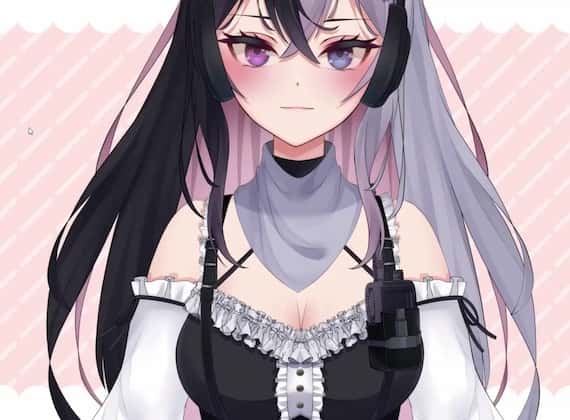
The character designs of 2D VTubers primarily follow an anime style. Many newcomers to animation in the VTuber community choose to start with 2D because it is simple and requires less time to set up. To create a 2D rig, you will need to use Live2D software. However, it’s important to note that 2D VTuber avatars can only move in a two-dimensional space.
What programs do 2D Vtubers use?
VTube Studio is a mobile application that focuses on 2D VTuber models with a specific emphasis on classic anime style. This app uses the front-facing camera on a smartphone or tablet to track facial movements and animate the VTuber model in real-time.
Is Live2D free version enough?
There is a no-cost version available for use at no charge. However, unlike the paid professional version, the capabilities are restricted. If you wish to access all features, please obtain a professional version license. The trial version can be utilized for a restricted period of 42 days.
What app do VTubers use?
The software called VTube Studio is compatible with Windows, MacOS, iOS, and Android operating systems. It is available for free on iOS and Android with the option to upgrade to advanced features for $21.35. On Windows and MacOS, it can be used for free with the option to remove the watermark for $7.30. Puppemoji is a free software available on iOS. CustomCast is another software available on iOS and Android for free, with the option to access advanced features for 500 JPY per month. VRChat, a social game and platform, is compatible with Windows and is free to use. There are 10 more software options available.